Anthropic ships an official “Human Resources” plugin for Claude Cowork — a pre-packaged bundle of HR-specific instructions, slash commands, and tool connections that turns a general-purpose assistant into something closer to an HR ops specialist. It’s a genuinely useful tool. It’s also been tested, and one of its core features — compensation benchmarking — has a documented accuracy problem serious enough that using it the wrong way could cost you a candidate or create a pay-equity issue you don’t find out about for a year.
This guide covers both halves: how the plugin actually works, mechanically, and where independent testing shows it breaks down. No course pitch at the end — just what you need to use it well.
TL;DR
- Claude for HR is Anthropic’s official plugin for Claude Cowork, bundling HR-specific slash commands, connectors, and templates into one setup.
- Eight core workflows: job descriptions, interview plans, compensation analysis, offer letters, onboarding plans, performance reviews, policy lookup, and people reports.
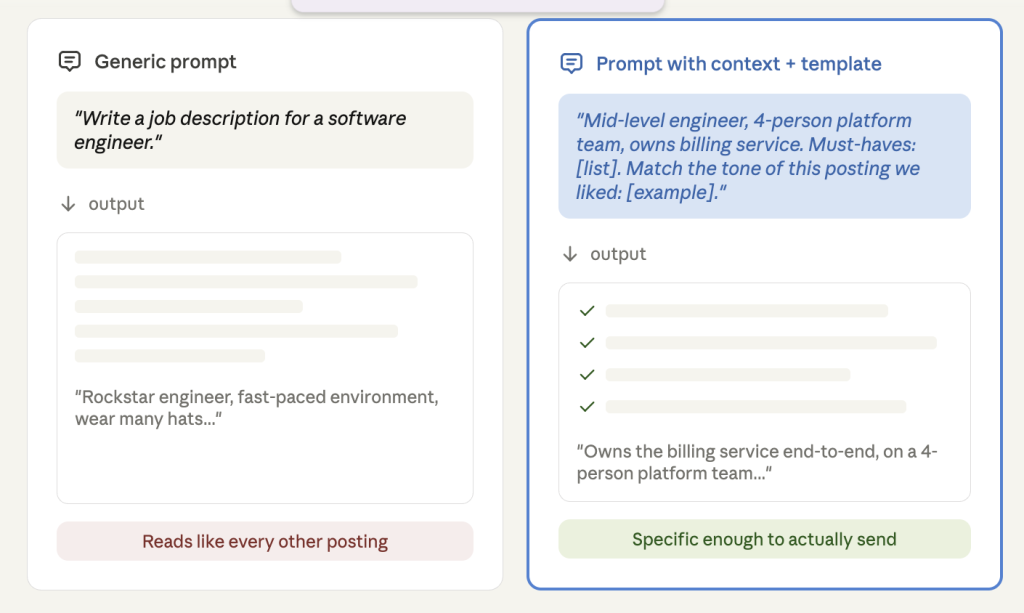
- Output quality depends heavily on loading your real templates and tone guidelines into Global Instructions before using it on live candidate or employee data.
- Compensation analysis is the riskiest command. Independent testing found 61% of pay figures were off by more than 15% vs. real-time benchmarks, with senior roles underestimated by 50–80%.
- Use compensation outputs only as a rough starting point for junior/mid-level roles — always verify senior-level numbers against a dedicated payroll platform (Pave, Radford, Levels.fyi, Ravio).
- Policy lookup, offer formatting, and onboarding plans are the most reliable workflows since they’re grounded in your own documents or structure, not invented facts.
- Performance reviews need a manager’s personal voice before going to an employee — never submit an unedited draft.
- Bottom line: a strong first-draft engine for repetitive HR documentation — not a decision-maker for pay, hiring, or termination calls.
What you’re actually installing
It helps to understand the four things bundled inside any Claude plugin, because they explain why HR’s plugin behaves differently from just typing prompts into Claude:
- Skills — background domain knowledge (HR terminology, document formats, review structures) that Claude draws on automatically when relevant. You don’t trigger these; they just inform how Claude responds.
- Slash commands — explicit workflows you trigger by typing
/followed by a command name. These are structured: Claude asks for the specific inputs it needs, then executes a defined process rather than free-improvising. - Connectors — links to your actual tools (ATS, HRIS, calendar, e-signature, knowledge base) via the Model Context Protocol, so Claude can read and sometimes write data instead of you copy-pasting it in.
- Sub-agents — for heavier tasks, the plugin can spin up parallel workers (for example, one analyzing pay data while another drafts the narrative) instead of doing everything in one linear pass.
Every command in the HR plugin works standalone, with no connectors at all — you just type the details in by hand. It gets meaningfully better once you connect real tools, because Claude is reading your actual templates, policies, and pay data instead of guessing at a generic version of them.
Also read: How to Conduct a Pay Equity Audit Without a Dedicated Comp Team
Setup, in full detail
- Get Claude Cowork. It ships inside the Claude desktop app (claude.com/download, macOS or Windows) — there’s no separate install. Open the app and switch to the Cowork tab using the mode selector.
- Install the plugin. In Cowork, open Customize → Plugins → Browse plugins, and install “Human Resources” (published by Anthropic). It’s part of the open-source Knowledge Work plugin collection, so you can also inspect or fork it on GitHub (
anthropics/knowledge-work-plugins) if you want to see exactly what each command does before trusting it with company data. - Connect your tools. Common categories: ATS (for candidate data), HRIS (employee records), calendar (Google Calendar, Microsoft 365), email (Gmail, Microsoft 365), chat (Slack, Teams), knowledge base (Notion, Confluence), and compensation data (Pave, Radford, Levels.fyi). You don’t need all of these — connect what’s relevant to the commands you’ll actually use.
- Load your real templates before you load real data. This is the step almost everyone skips and the one that matters most. Open Settings → Cowork → Global Instructions and paste in your tone guidelines, your standard offer letter format, your review rubric, your job description structure. Every output gets noticeably less generic once Claude has a real example to match instead of inventing one.
- Decide what needs human sign-off, and say so explicitly. Add a line to your global instructions like: “Never finalize compensation numbers, termination language, or anything sent externally without flagging it for review first.” Claude will follow stated boundaries reliably; it won’t infer where your comfort line is unless you draw it.
- Browse commands. Type
/in the Cowork chat to see everything currently available — command names and exact behavior do shift as Anthropic updates the plugin, so this is the source of truth, not any article (including this one).
If you’re on a Team or Enterprise plan, an admin may pre-install or restrict which plugins are available, and can distribute a customized version with your company’s templates baked in for the whole HR team — worth asking your Claude admin about before everyone configures their own copy separately.
The 8 workflows, in detail
1. Job description drafting
Give Claude the role, level, team, and the 2–3 responsibilities that actually matter (not a copy-paste of the last posting). It will draft a description and — if you ask it to — flag requirements that might be narrowing your candidate pool more than necessary, e.g. an arbitrary years-of-experience cutoff for a skill that’s actually learnable fast.
Watch for: job descriptions are exactly the kind of document where biased or exclusionary language creeps in unnoticed. If you’re loading past postings as style examples, screen them for that first — Claude will treat your examples as “what good looks like” and may reproduce patterns you didn’t intend to keep.
2. Structured interview plans
Provide the role and the specific competency you’re probing for. Output: behavioral questions (not hypotheticals), follow-up probes for vague answers, and a lightweight scoring rubric per question — useful for keeping multiple interviewers evaluating the same thing.
3. Compensation analysis
Connect a spreadsheet or HRIS export with role, level, and location, and Claude builds a pay-vs-market table, flags outliers and equity gaps, and writes a plain-language summary.
This is the command to use carefully — see the dedicated section below before relying on it for anything that touches an actual offer.
4. Offer letter drafting
Give Claude the role, level, agreed comp, start date, and key terms. With your template loaded in setup, it produces a fully formatted draft; with a DocuSign connector, it can route the draft for signature once you approve it.
Watch for: Claude can’t verify that the compensation number you give it is correct, or that the terms comply with the candidate’s jurisdiction. It will format whatever you tell it perfectly — the legal and numerical accuracy is still on you.
5. Onboarding plans
Give it the new hire’s role, team, manager, and real 30/60/90-day goals — not just “onboard them.” The more specific the milestones you provide, the less generic the plan; a plan built around “ship a small fix by week 3” is far more useful than a plan built around “learn the codebase.”
6. Performance review drafting
Feed in goals, feedback (manager notes, peer input, self-review), and review period. Claude drafts a structured review — achievements, growth areas, rating justification — consistently formatted across a whole review cycle, which is genuinely valuable when one manager is writing fifteen of these in the same week.
Hard line: this output goes to the employee and feeds pay and promotion decisions. A manager submitting an unedited draft is both a quality problem and, frankly, unfair to the person being reviewed — the plan should always be that the manager personalizes it before it’s seen.
7. Policy lookup and explanation
Connect your handbook or knowledge base, ask a real question (“How does parental leave apply to a fixed-term contract employee?”), and Claude finds the relevant section and rewrites it in plain language — as an employee FAQ, a manager briefing, whatever format you ask for.
This is one of the more reliable commands, because the answer is grounded in a document you already wrote — Claude’s job is translation and retrieval, not generation from scratch. The accuracy ceiling is your policy documents’ accuracy; if they’re outdated, the lookup will confidently surface the outdated version.
8. People reporting
Feed in headcount, attrition, time-to-fill, or engagement metrics, specify the audience (a board update reads very differently from a CHRO briefing), and Claude builds a narrative report — sometimes with a presentation generated directly from the same data if you have the right connectors.
Watch for: Claude can describe what the numbers say. It can’t tell you what they mean for your specific business context — a 12% attrition spike means something completely different during a hiring freeze than during a competitor’s aggressive poaching campaign. The narrative framing is still your job.
Also read: Compensation Benchmarking Tool: What Finance Teams Should Actually Look For
The compensation accuracy problem, in detail
This is the part worth slowing down on, because it’s the one place where the plugin’s confident, well-formatted output can actively mislead you.
AIHR ran a structured test comparing the plugin’s compensation outputs against Ravio, a real-time payroll benchmarking platform covering 46+ countries, across seven seniority levels and three job families (account management/customer success, software engineering, and accounting) in the Dutch tech sector — a market with unusually good public salary data, which should have been close to a best-case scenario for the model.
The results, as reported in that test:
- 16% of figures landed within ±5% of the real-time benchmark — a close match
- 23% were off by 5–15%
- 61% were off by more than 15% — a critical mismatch
The errors weren’t random noise. They followed a consistent pattern: the model compressed the range between junior and senior pay, underestimating senior individual-contributor compensation by an estimated 50–80% relative to the benchmark across all three job families tested. The reported cause is structural, not a one-off glitch: the model draws on publicly available, often self-reported salary data (the kind found on sites like Glassdoor or LinkedIn Salary), and that data is abundant for junior roles and thin and unreliable for senior, specialized ones — exactly where getting it wrong has the biggest consequences.
What this actually means for how you use the comp command:
- Treat it as a rough, early orientation for junior and mid-level roles only — a number to sanity-check, never a number to offer.
- For senior or specialist roles, don’t use it as a standalone source at all. Cross-reference against a dedicated payroll-data platform (Pave, Radford, Levels.fyi, Ravio, Mercer) before any number reaches a candidate or a comp committee.
- The compression pattern means the risk isn’t “slightly off” — it’s systematically lowballing exactly the offers most likely to be contested or to create a later pay-equity finding.
- The test reportedly ran against a default, unconfigured instance of the plugin. A setup loaded with your own verified comp bands and connected directly to a live payroll-data source should perform meaningfully better than the worst case here — but verify that for your own setup rather than assuming it.
Where the plugin earns trust, and where it doesn’t
| Workflow | Reliability | Why |
|---|---|---|
| Policy lookup | High | Grounded in your own documents; retrieval, not invention |
| Offer letter formatting | High (with your template loaded) | Formatting and structure are low-risk; the numbers you supply are the risk |
| Onboarding plans | High | No factual claims to get wrong — it’s organizing your inputs |
| Job descriptions, interview plans | High | Same — structure and synthesis, not factual claims |
| Performance review drafts | Medium | Good first draft; needs a human’s actual voice and judgment before it reaches anyone |
| People reports | Medium | Numbers are accurate if your source data is; narrative interpretation is yours to add |
| Compensation analysis (junior roles) | Medium | Usable as a rough starting orientation |
| Compensation analysis (senior roles) | Low — verify externally | Documented systematic underestimation |
FAQ
Is this the same as just prompting Claude in regular chat? No — the plugin adds structured commands, default workflows, and connector access that a freeform chat prompt doesn’t have. But you can replicate most of the drafting workflows without the plugin if you give Claude equivalent context manually.
Does it require Claude Cowork specifically, or does it work in regular chat too? Skills bundled in the plugin work in chat and Cowork; slash commands, connectors-as-actions, and sub-agents are Cowork-specific.
Can I edit what the commands do? Yes — every component is file-based (markdown and JSON), so you, or your Claude admin, can open the plugin and rewrite a command’s instructions to match how your team actually works, including swapping which connectors it expects.
What’s the single highest-leverage thing to do before rolling this out to an HR team? Load real templates and explicit “don’t decide this without a human” boundaries into the global instructions before anyone starts using commands on live candidate or employee data. The plugin’s output quality is bounded by what you give it to imitate — and the consequences of an unreviewed comp number or termination letter are not symmetrical with the time saved.
The bottom line
Claude for HR is a strong first-draft engine for the document-heavy, repetitive parts of the job — job descriptions, offer formatting, onboarding structure, policy translation, performance review consistency. It is not a source of truth for compensation decisions at the levels where getting it wrong matters most, and it shouldn’t be making — only drafting toward — any decision about a specific person’s hiring, pay, or employment status. Used that way, it’s a real time-saver. Used as a shortcut around human judgment on the decisions that matter, it’s a liability with very good formatting.