Human Resources Information Systems (HRIS) have become foundational infrastructure for modern organizations. Yet many HR professionals and business leaders still struggle to articulate exactly what an HRIS does, when it makes sense to invest in one, and where it falls short. This article cuts through the noise.
- HRIS = centralized HR infrastructure. It replaces spreadsheets and manual processes with a single system for employee data, payroll, benefits, time tracking, and compliance.
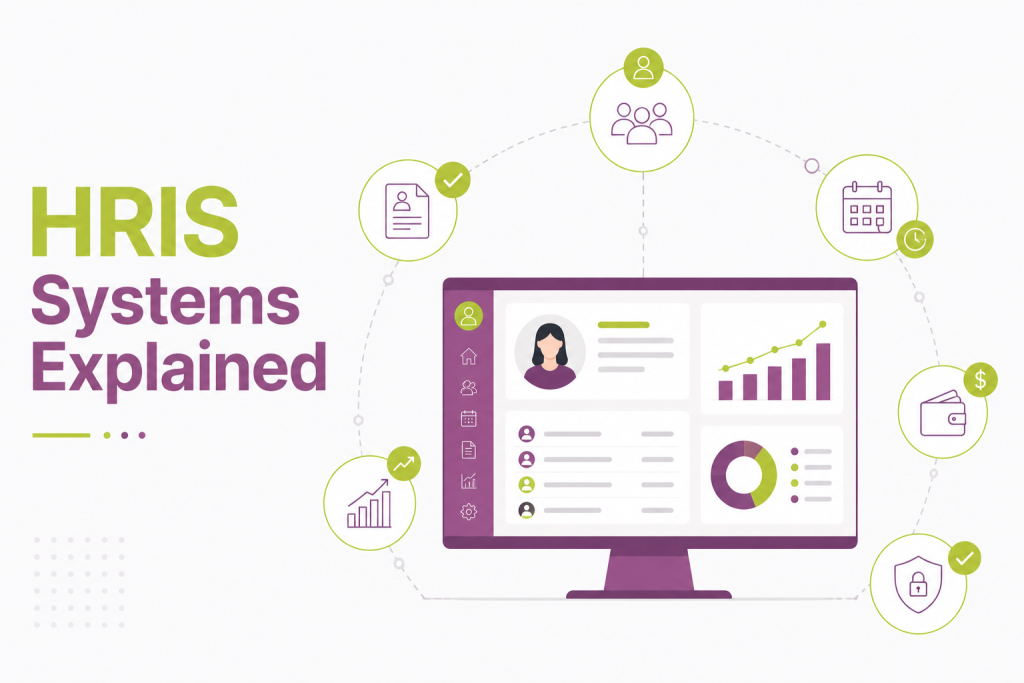
- Eight core features drive most of the value: employee records, payroll, benefits admin, time & attendance, onboarding/offboarding, performance management, reporting, and compliance tracking.
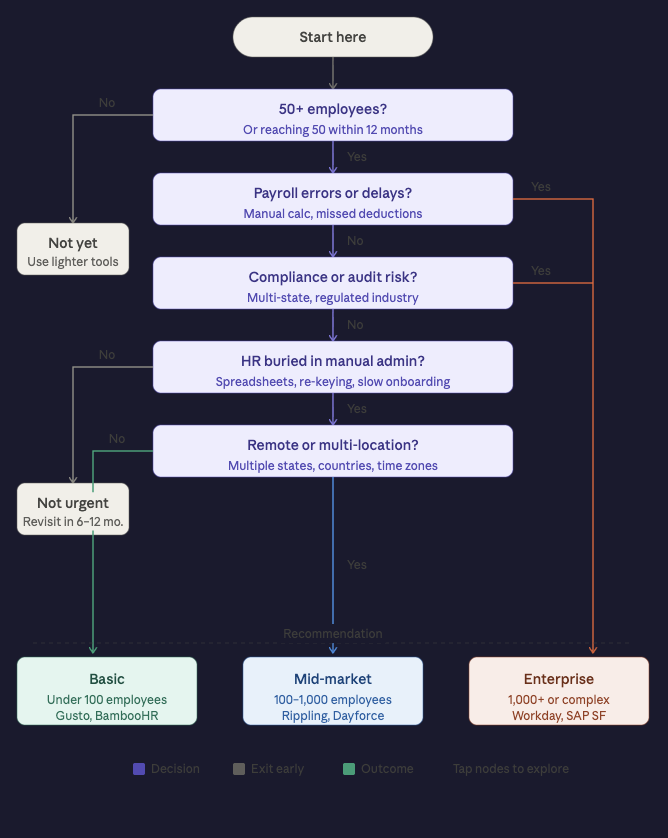
- Best suited for companies 50+ employees — or any organization dealing with distributed teams, M&A integration, audit requirements, or HR teams buried in admin work.
- Limitations are real: implementation takes longer than vendors admit, customization has a ceiling, integrations get messy, and costs scale fast with headcount.
- An HRIS won’t fix broken processes — it automates them. Clean data and defined workflows before implementation are non-negotiable.
- Platform choice depends on size and complexity: Gusto and BambooHR for small businesses, Rippling for mid-market, Workday and SAP SuccessFactors for enterprise.
- It doesn’t replace HR teams — it frees them from repetitive admin so they can focus on decisions that require human judgment.
What is an HRIS?
An HRIS is a software platform that centralizes employee data and automates core HR processes. At its most basic, it’s a single source of truth for everything from headcount to payroll history to performance reviews. The term is often used interchangeably with HCM (Human Capital Management) and HRMS (Human Resource Management System), though there are subtle distinctions — HCM platforms tend to include more strategic workforce planning tools, while HRMS emphasizes process automation. HRIS is the umbrella term most organizations use in practice.
The shift from paper files and spreadsheets to a dedicated HRIS typically happens when a company crosses the 50–100 employee mark, though some organizations adopt one earlier to build scalable infrastructure from the start.
Also read: How AI is Currently Being Used in HR
Core Features
1. Employee Records Management
The backbone of any HRIS is a centralized employee database. This includes personal information, employment history, job titles, compensation, reporting structure, and documents like contracts and certifications. Rather than hunting through shared drives or filing cabinets, HR teams can retrieve or update any employee record in seconds. Audit trails ensure accountability — every change is logged with a timestamp and user ID.
2. Payroll Processing
Most modern HRIS platforms either include native payroll functionality or integrate tightly with payroll providers. This means automatically calculating gross pay, deductions, taxes, and net pay based on hours worked, salary structures, and local tax rules. Direct deposit scheduling, pay stub generation, and year-end tax forms (W-2s, 1099s) are typically handled within the same system, reducing the reconciliation burden that plagues disconnected tools.
3. Benefits Administration
Managing health insurance, retirement plans, paid time off, and other benefits is notoriously complex. An HRIS simplifies enrollment workflows, tracks employee elections, and syncs with benefits carriers to ensure coverage is accurate. Self-service portals let employees update their own dependents or benefit elections during open enrollment without HR playing middleman for every change.
4. Time and Attendance Tracking
Clock-in/clock-out functionality, shift scheduling, leave management, and overtime calculations are standard in most HRIS platforms. Integration with physical time clocks or mobile apps allows real-time attendance data to flow directly into payroll, eliminating manual data entry and reducing payroll errors.
5. Onboarding and Offboarding
A structured HRIS automates the administrative side of onboarding: sending offer letters, collecting digital signatures, provisioning access requests, and delivering compliance training assignments. Offboarding workflows mirror this in reverse — triggering equipment return checklists, revoking system access, and generating final pay calculations.
6. Performance Management
Goal setting, continuous feedback, and formal performance reviews can be managed within the HRIS, creating a documented record of employee development over time. Managers can track goal progress, leave comments, and complete structured evaluations — all tied to the employee’s core profile.
7. Reporting and Analytics
An HRIS transforms raw HR data into actionable insight. Standard reports cover headcount by department, turnover rates, compensation bands, time-to-hire, and absenteeism trends. More advanced platforms offer workforce planning dashboards and predictive analytics, such as flight risk scoring based on engagement and tenure patterns.
8. Compliance Management
Employment law compliance is a significant HRIS value driver. The system can track required certifications, flag upcoming renewals, manage I-9 and EEO documentation, and generate reports for audits. For multi-jurisdiction employers, built-in compliance rules help navigate differing state or country labor regulations.
Also read: Cloud-Based HRIS: What It Is, How It Works, and What to Look For
Common Use Cases
Scaling from startup to mid-market. A company that managed HR through a shared Google Sheet hits a wall around 75 employees. An HRIS creates the infrastructure to scale hiring, manage a more complex org structure, and give managers self-service access to their teams’ data without bottlenecking every request through HR.
Mergers and acquisitions. Integrating two workforces with different compensation structures, benefit plans, and HR processes is a nightmare without a unified system. An HRIS becomes the consolidation layer that normalizes employee data and enforces consistent processes across the combined entity.
Remote and distributed teams. For companies with employees across multiple states or countries, an HRIS handles jurisdiction-specific payroll tax rules, tracks time across time zones, and gives employees a single portal regardless of where they’re located.
Reducing HR administrative load. When HR generalists spend most of their time answering “how many vacation days do I have left?” or re-entering the same data in three different systems, an HRIS self-service model frees them up for higher-value work like workforce planning and employee development.
Audit readiness. Organizations in regulated industries — healthcare, finance, government contracting — need to demonstrate compliant recordkeeping on demand. An HRIS maintains the documentation trail and generates audit reports without requiring manual file assembly.
Key Limitations
For all their value, HRIS platforms have real constraints that organizations should understand before committing.
Implementation is harder than vendors suggest. The average HRIS implementation takes three to six months, and complex deployments can stretch to a year or more. Data migration from legacy systems is frequently underestimated — cleaning, mapping, and validating years of employee records is unglamorous, time-consuming work. Companies that rush implementation often inherit the same data quality problems in a more expensive system.
Customization has a ceiling. Most HRIS platforms are designed for the median company in a given size range. Organizations with unusual compensation structures, highly customized workflows, or niche industry requirements often find that the system handles 80% of what they need elegantly — and the remaining 20% requires expensive professional services, workarounds, or is simply not possible.
Integration complexity. An HRIS rarely operates in isolation. It needs to connect with applicant tracking systems, learning management platforms, expense tools, ERP systems, and identity management software. Native integrations exist for popular tools, but anything outside the standard ecosystem often requires custom API work and ongoing maintenance when either system updates.
Cost scales quickly. SaaS HRIS pricing is typically per-employee-per-month. What looks affordable at 100 employees becomes a significant line item at 500 or 1,000. Factor in implementation fees, training, and the cost of integrations, and total cost of ownership is often two to three times the base subscription price.
Analytics depth varies widely. Many mid-market HRIS platforms offer reporting, but genuinely useful workforce analytics — trend analysis, predictive modeling, cohort comparisons — require either an enterprise-tier platform or a separate analytics tool. Out-of-the-box dashboards often provide descriptive data rather than insight.
It doesn’t fix broken HR processes. An HRIS automates processes; it doesn’t redesign them. Organizations that implement a system without first clarifying their workflows, job architecture, and data governance practices tend to automate their existing mess at higher cost. Garbage in, garbage out applies here as much as anywhere.
Choosing the Right Platform
There’s no universal answer. The right HRIS depends on company size, industry, geographic complexity, budget, and internal technical capacity. Workday and SAP SuccessFactors dominate the enterprise market. BambooHR and Rippling are popular with small-to-mid-market companies. Gusto targets small businesses with an emphasis on payroll simplicity. Ceridian Dayforce and UKG Pro serve complex, often hourly workforces.
The most important question isn’t which system has the best feature list — it’s which system your HR team will actually use, and which one maps to the complexity of your workforce today and in three years.
The Bottom Line
An HRIS is not a silver bullet, but for any organization managing more than a handful of employees, it’s essential infrastructure. The core value proposition is straightforward: replace scattered, manual processes with a single system that makes employee data accurate, accessible, and actionable. The organizations that get the most from their HRIS invest in clean data, thoughtful implementation, and ongoing process discipline — not just the technology itself.
FAQs-
1. What’s the difference between an HRIS, HRMS, and HCM?
These terms are often used interchangeably, but there are distinctions. HRIS focuses on data management and core HR administration. HRMS adds process automation on top of that. HCM is the broadest term, encompassing strategic functions like workforce planning, succession management, and talent analytics. In practice, most modern platforms blur these lines — vendors tend to use whichever label markets best for their target segment.
2. How long does it take to implement an HRIS?
For a small company (under 100 employees) with clean data and a simple setup, implementation can take 4–8 weeks. Mid-market deployments typically run 3–6 months. Enterprise implementations with complex integrations, multiple payroll jurisdictions, or legacy data migration can take 9–18 months. The biggest variable is almost always data quality, not the software itself.
3. Can a small business justify the cost of an HRIS?
Often yes, even at 20–30 employees. The calculation isn’t just software cost versus current cost — it’s also the risk cost of compliance errors, payroll mistakes, and the opportunity cost of HR time spent on manual admin. Platforms like Gusto and BambooHR offer entry-level pricing specifically designed for small businesses.
4. Does an HRIS replace the need for an HR team?
No. An HRIS handles administrative volume and data management, but it doesn’t make hiring decisions, resolve workplace conflicts, design compensation strategy, or build culture. It frees HR professionals from repetitive tasks so they can focus on work that actually requires human judgment.
5. What should we do before selecting an HRIS?
Audit your current processes first. Document how payroll runs, where employee data lives, what integrations you’ll need, and which workflows are broken versus just manual. Companies that skip this step often implement a new system on top of old dysfunction. A clear requirements list also gives you a fair basis for comparing vendors rather than being led by their demo scripts.