If you’ve spent any time in HR, you’ve almost certainly heard the acronym HRIS thrown around in conversations about software, budgets, and digital transformation. But what does it actually mean — and do you really need one?
This guide breaks it down clearly, without the vendor jargon.
TL;DR
- HRIS (Human Resource Information System) is software that centralises all employee data and HR workflows in one place.
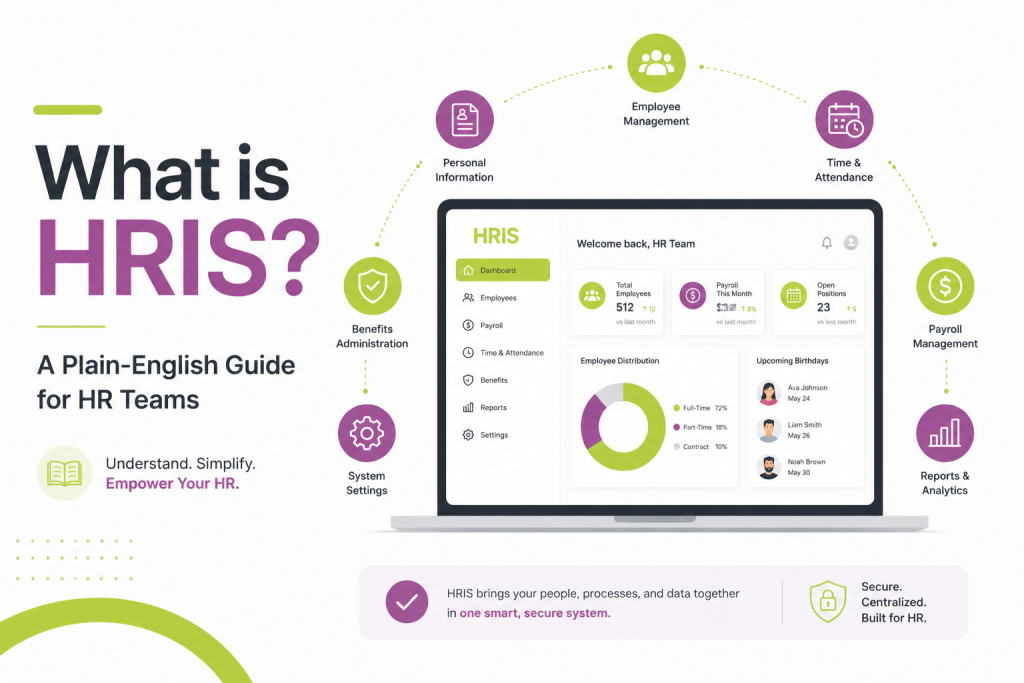
- Core functions include employee records, payroll, benefits, time & attendance, onboarding, and analytics.
- It saves time, reduces errors, supports compliance, and improves the employee experience.
- Most organisations feel the pain around 50 employees — that’s the tipping point where an HRIS starts to pay for itself.
- Popular platforms: BambooHR (small teams), Rippling / ADP (mid-size), Workday / SAP SuccessFactors (enterprise).
- An HRIS doesn’t replace HR staff — it frees them to focus on the work that actually matters.
The Basic Definition
HRIS stands for Human Resource Information System. At its core, it’s software that stores, manages, and processes employee data and HR-related workflows in one central place.
Think of it as the single source of truth for everything related to your workforce: who works for you, what they’re paid, when they work, what benefits they’ve enrolled in, and much more. Instead of juggling spreadsheets, paper forms, and disconnected tools, an HRIS brings it all under one roof.
You’ll sometimes hear similar terms used interchangeably — HCM (Human Capital Management) and HRMS (Human Resource Management System). While there are subtle differences (HCM tends to include more strategic workforce planning features; HRMS often adds payroll processing), in everyday usage most HR professionals use these terms to mean roughly the same thing.
Also read: How AI is Revolutionizing Compensation Budgeting: The Stello AI Advantage
What Does an HRIS Actually Do?
Modern HRIS platforms typically cover several core functions:
Employee Records Management This is the foundation. An HRIS stores every employee’s personal details, job title, department, start date, compensation history, and employment status. No more hunting through filing cabinets or cross-referencing three different spreadsheets to find someone’s emergency contact.
Payroll and Compensation Many systems either include built-in payroll processing or integrate directly with dedicated payroll software. This means salary changes, tax withholdings, bonuses, and deductions flow automatically — reducing manual errors and ensuring employees get paid correctly and on time.
Benefits Administration From health insurance enrollment to retirement contributions, an HRIS lets employees manage their own benefits through a self-service portal. HR teams can track enrollment, manage open enrollment periods, and stay compliant with plan requirements without drowning in paperwork.
Time and Attendance Tracking hours worked, managing leave requests, monitoring PTO balances, and flagging overtime — all handled in one system. This is especially valuable for organizations with hourly workers or complex shift schedules.
Onboarding and Offboarding A good HRIS automates the administrative side of bringing someone new on board: sending offer letters, collecting signed documents, setting up accounts, and assigning training. The same goes for offboarding — ensuring exit checklists are completed and access is properly revoked.
Reporting and Analytics Perhaps the most powerful feature for strategic HR. An HRIS can generate reports on headcount, turnover rates, absenteeism, compensation gaps, and dozens of other metrics — giving HR leaders the data they need to make informed decisions and present evidence-based arguments to leadership.
Also read: AI HR Agents for Remote & Distributed Teams
Why Does It Matter?
Before HRIS systems became widespread, HR teams spent enormous amounts of time on manual, repetitive administrative tasks. Updating employee records meant editing multiple spreadsheets. Running a headcount report meant pulling data from several places and hoping it was current. Compliance audits were stressful, time-consuming exercises in document retrieval.
An HRIS changes this in a few important ways:
It saves time. Automating routine tasks — like sending onboarding documents or calculating leave balances — frees HR professionals to focus on work that actually requires human judgment: employee relations, culture, recruiting, and development.
It reduces errors. Manual data entry is error-prone. A single mistake in a spreadsheet can ripple across payroll, compliance filings, and benefits records. Centralizing data in one system with built-in validation dramatically reduces these risks.
It supports compliance. Employment law requires organizations to maintain accurate records — from working hours to equal pay data. An HRIS keeps these records organized and audit-ready, reducing the risk of costly compliance failures.
It improves the employee experience. Self-service portals let employees update their own information, request leave, download pay stubs, and access HR policies without emailing HR for every minor query. That’s better for employees and a significant time-saver for HR teams.
Also read: Best HRIS Software in 2026: How to Evaluate Options
Who Needs an HRIS?
The honest answer: most organizations benefit from one, but the right system depends on size and complexity.
A company with 15 employees might manage fine with a simpler tool or even a well-structured spreadsheet system. But by the time you’re managing 50 or more employees, the complexity of payroll, benefits, compliance, and reporting usually makes a dedicated HRIS a sound investment.
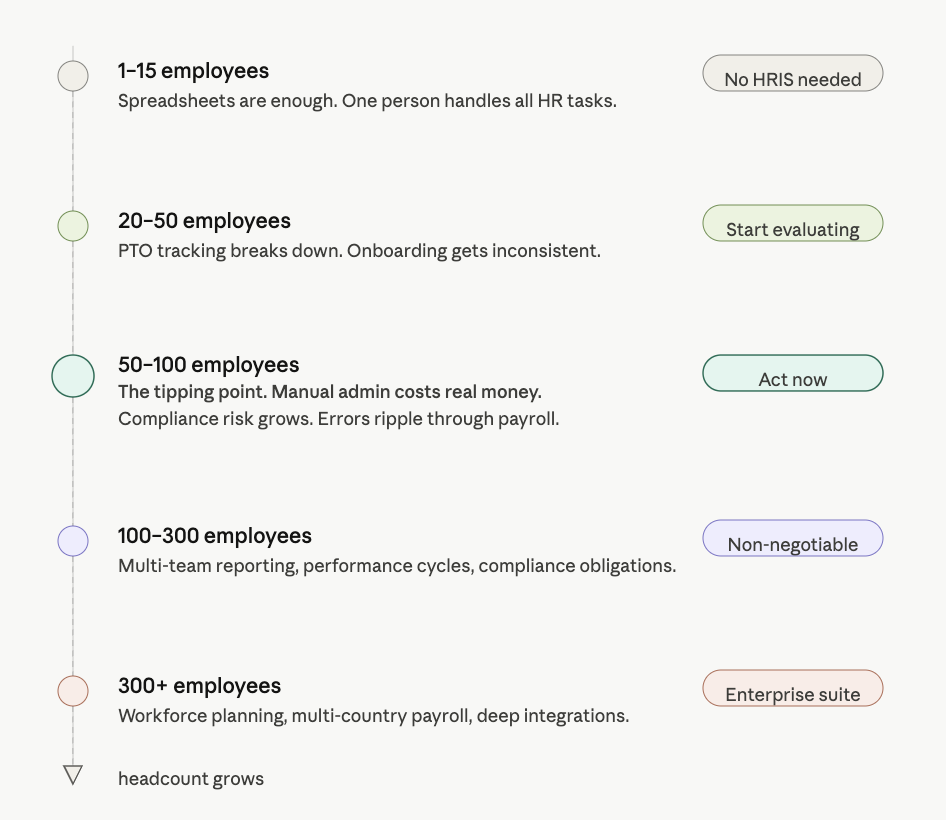
For mid-size and enterprise organizations, an HRIS isn’t optional — it’s essential infrastructure. Multi-location workforces, complex benefits plans, regulatory requirements, and the sheer volume of employee data make manual management untenable.
Choosing the Right HRIS
The market is large, with platforms ranging from lightweight tools to enterprise-grade systems. Some of the most widely used include Workday, BambooHR, ADP Workforce Now, Rippling, UKG, and SAP SuccessFactors.
When evaluating options, ask yourself:
- What are our biggest pain points today? Prioritize a system that solves your most pressing problems first.
- How well does it integrate? Your HRIS should connect cleanly with your payroll provider, benefits broker, ATS, and other tools you already use.
- Is it scalable? Choose a platform that can grow with you, not one you’ll outgrow in two years.
- How’s the user experience? If employees and managers find it confusing, adoption will suffer. Demo the product with real end users, not just HR admins.
- What does support look like? Implementation and ongoing support quality vary widely. Check reviews and ask for references.
The Bottom Line
An HRIS is, at its simplest, a system that helps HR teams do their jobs better — with less manual work, fewer errors, and better data. It’s not a magic solution to every HR challenge, but for most organizations it’s one of the highest-impact investments an HR leader can make.
If your team is still running on spreadsheets and email threads, it’s probably time to take a closer look. The right HRIS won’t replace the human side of HR — it’ll free you up to focus on it.
FAQs-
1. What’s the difference between an HRIS, HRMS, and HCM?
The terms are often used interchangeably, but there are loose distinctions. An HRIS is primarily focused on storing and managing employee data. An HRMS typically adds payroll processing and workforce management on top of that. HCM (Human Capital Management) is the broadest category — it includes everything in an HRMS plus strategic tools like succession planning, performance management, and learning and development. In practice, many modern platforms blur these lines and market themselves as all three.
2. How long does it take to implement an HRIS?
It depends on the size of your organization and the complexity of the system. A small business adopting a straightforward platform like BambooHR might be up and running in a few weeks. A large enterprise rolling out Workday or SAP SuccessFactors can expect an implementation that takes anywhere from six months to over a year. The biggest time investments are usually data migration (moving records from old systems), integrations with existing tools, and training employees to use the new platform.
3. Is employee data safe in an HRIS?
Reputable HRIS vendors take data security seriously — most offer role-based access controls, encryption at rest and in transit, SOC 2 compliance, and regular security audits. That said, no system is risk-free. Before signing a contract, ask vendors about their data residency policies, breach notification procedures, and uptime guarantees. You should also ensure the platform supports your compliance obligations — particularly if you operate in regions with strict data privacy laws like GDPR in Europe or PDPA in certain Asian markets.
4. Can a small business benefit from an HRIS, or is it only for large companies?
Small businesses can absolutely benefit — especially as they start to grow. Once you’re hiring regularly, managing PTO manually, or spending hours each month on payroll admin, the time savings alone often justify the cost. Many vendors offer pricing tiers specifically designed for smaller teams, so you don’t have to pay for enterprise features you don’t need. Tools like BambooHR, Rippling, and Gusto are popular choices for companies in the 10–100 employee range.
5. Will an HRIS replace HR staff?
No — and this concern comes up often. An HRIS automates administrative and transactional work, but it can’t replace the judgment, empathy, and relationship-building that define effective HR. In fact, most HR professionals find that once the system handles routine tasks, they have more time for the work that actually moves the needle: developing people, resolving conflicts, shaping culture, and advising leadership. Think of an HRIS as a tool that makes HR teams more effective, not redundant.