Every growing business reaches a point where managing people becomes as complex as managing the business itself. Spreadsheets pile up. Payroll errors creep in. HR teams spend more time chasing paperwork than supporting employees. This is the moment when HRIS software becomes not just useful, but essential — and when the wrong system, or an outdated one, can quietly hold your organization back.
⚡ TL;DR
HRIS software centralises every HR function in one place — and knowing when you’ve outgrown yours is just as important as choosing it in the first place.
- HRIS brings payroll, attendance, hiring, performance, and compliance under one roof — eliminating the patchwork of disconnected tools most HR teams rely on.
- It’s different from HRIS (data-focused) and HCM (strategic) — though modern platforms increasingly combine all three.
- The core benefits are time savings, fewer payroll errors, compliance confidence, and employee self-service — not just admin automation.
- Key modules to evaluate: core HR database, payroll, leave & attendance, recruitment (ATS), performance management, and analytics.
- You’ve outgrown your system if HR is drowning in manual work, payroll errors are frequent, or compliance keeps you up at night — these aren’t minor inconveniences.
- Other red flags: too many disconnected tools, no employee self-service, and managers who can’t access basic workforce data without raising a ticket.
- If you can’t answer “what’s our attrition rate?” without building a report from scratch, your analytics layer is missing — and leadership is flying blind.
- When switching, audit your pain points first, prioritise integration with your accounting/ERP stack, and involve HR, finance, and employees in the selection.
- HRIS is not a permanent decision — the right system for 50 employees may be the wrong one at 500. Revisit it as your business grows.
What is HRIS Software?
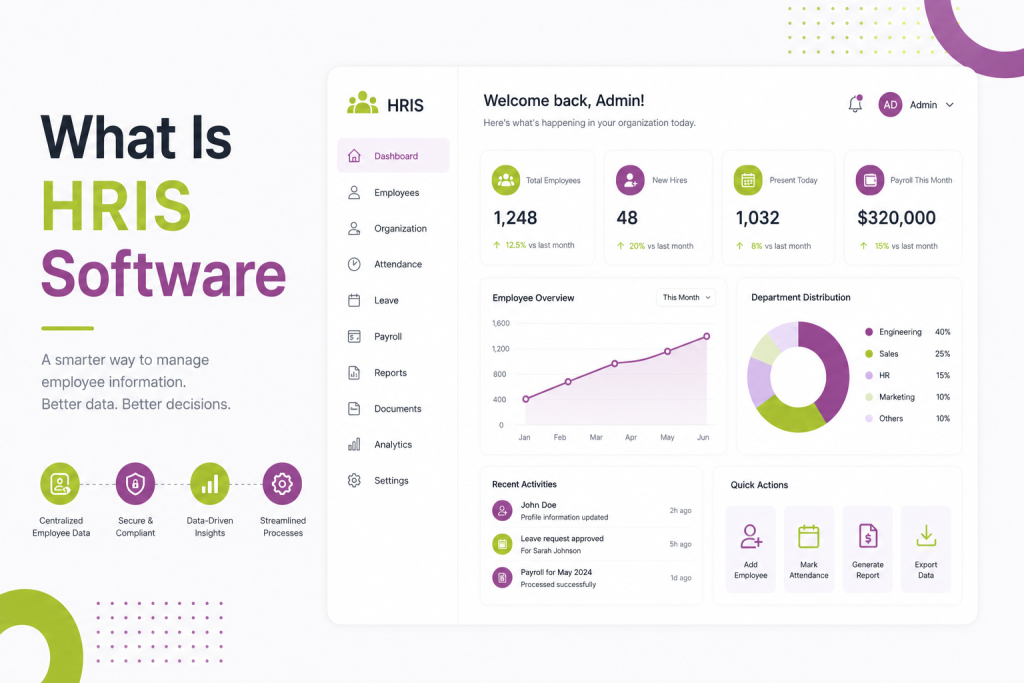
HRIS stands for Human Resources Information System. It is a category of software designed to centralize and automate the administrative, operational, and strategic functions of a human resources department. In simple terms, it is the digital backbone of everything that touches your employees — from the day they are hired to the day they leave.
An HRIS typically brings together several HR functions under one roof:
- Employee records management — a centralized database storing personal details, job history, documents, and employment status
- Payroll processing — automating salary calculations, tax deductions, compliance filings, and pay disbursements
- Leave and attendance tracking — managing time-off requests, shift schedules, and absence patterns
- Recruitment and onboarding — tracking applicants, automating offer letters, and guiding new hires through their first days
- Performance management — setting goals, conducting appraisals, and tracking employee development
- Benefits administration — managing health insurance, provident fund, gratuity, and other employee benefits
- Compliance and reporting — generating statutory reports and ensuring adherence to labor laws
You may also come across the terms HRMS (Human Resource Management System) and HCM (Human Capital Management). While these are often used interchangeably, there are subtle distinctions. HRIS tends to focus on data and records. HRIS adds operational automation on top of that. HCM takes a broader, more strategic view — covering workforce planning, succession, and talent analytics. In practice, many modern platforms combine all three.
Also read: 10 Real-World AI in HR Examples (And What You Can Learn From Each)
Why Businesses Adopt HRIS Software
Before HRIS, HR teams relied on a patchwork of tools — Excel sheets for employee data, separate software for payroll, email chains for leave approvals, and physical files for compliance documents. This fragmented approach is not just inefficient; it is error-prone and increasingly unsustainable as a company grows.
HRIS software addresses this by creating a single source of truth for all people-related data. When an employee’s salary changes, that update flows automatically into payroll, tax calculations, and reporting — no manual re-entry required. When someone applies for leave, their manager gets a notification, approves it with a click, and the attendance record updates instantly.
The business case for HRIS adoption typically comes down to four factors:
Time savings. HR professionals often report spending a significant portion of their week on administrative tasks — processing payroll, answering repetitive employee queries, updating records. HRIS automates the bulk of these tasks, freeing HR teams to focus on hiring, culture, and employee development.
Accuracy. Manual data entry introduces errors. Payroll mistakes damage employee trust and can result in costly compliance penalties. Automation reduces the margin for human error significantly.
Compliance. Labor laws, tax regulations, and statutory requirements change frequently. A good HRIS keeps up with these changes and flags potential issues before they become legal problems.
Employee experience. Modern HRIS platforms include employee self-service portals where staff can view their payslips, apply for leave, update personal details, and access company policies — without raising a support ticket with HR.
Core Modules to Look For
Not all HRIS platforms are built the same way. When evaluating options, it helps to understand which modules matter most for your stage of growth.
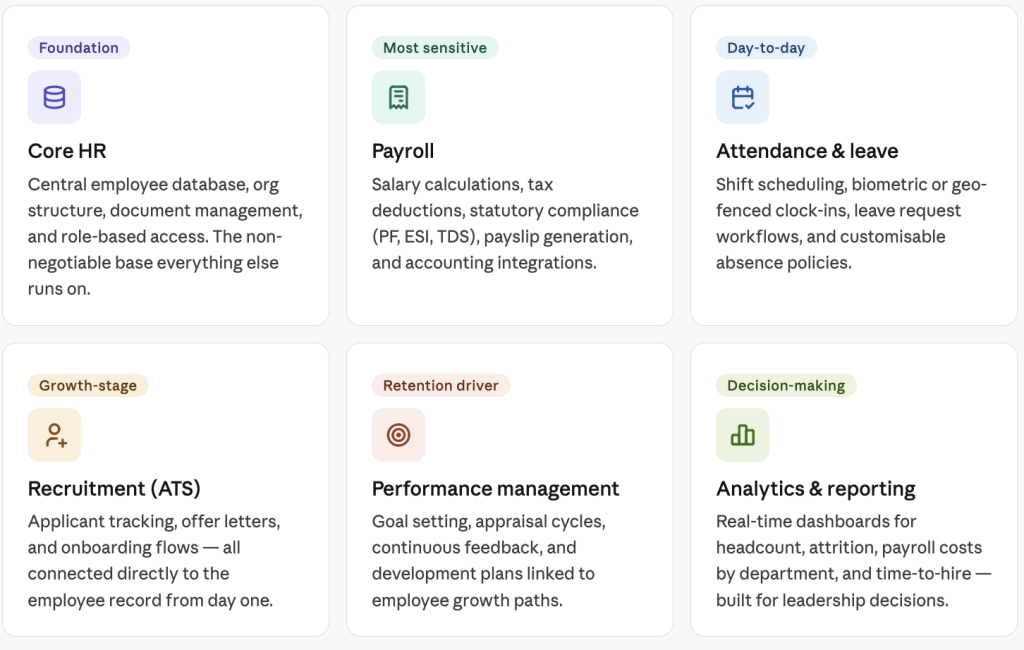
Core HR is the non-negotiable foundation. It covers the employee database, organizational structure, document management, and role-based access control. Without a solid core, everything built on top becomes unreliable.
Payroll is often the most sensitive module. It needs to handle multi-state or multi-country taxation, statutory deductions (PF, ESI, TDS in the Indian context), and generate accurate payslips on schedule. Integration with accounting software like Tally or QuickBooks is a major plus.
Attendance and leave management becomes critical once you have employees across locations, shifts, or remote setups. Look for biometric integration, geo-fencing for field staff, and customizable leave policies.
Recruitment (ATS) matters if your hiring volume is growing. A built-in applicant tracking system eliminates the need for a separate tool and keeps candidate data connected to the eventual employee record.
Learning and development modules are increasingly important as organizations invest in upskilling. These track training completion, certifications, and link development plans to performance goals.
Analytics and reporting separate basic HRIS tools from mature platforms. Real-time dashboards showing headcount trends, attrition risk, payroll costs by department, and time-to-hire give leadership the visibility they need to make decisions.
When You’ve Outgrown Your Current HRIS
Implementing an HRIS is not a one-time decision. The system that served you well at 50 employees may become a liability at 500. Here are the clear signals that your current solution — whether it is spreadsheets, a legacy tool, or an entry-level platform — is no longer enough.
1. Your HR Team Is Drowning in Manual Work
If your HR team spends most of their time on data entry, chasing approvals, or correcting payroll errors, your system is working against you. A mature HRIS should handle the routine so your team handles the exceptional. When the volume of administrative work scales with headcount rather than staying flat, it is a sign your automation is insufficient.
2. Payroll Errors Are Becoming Frequent
Payroll mistakes — incorrect deductions, missed arrears, wrong reimbursements — are not just embarrassing. They erode employee trust in ways that take months to rebuild. If your finance and HR teams are spending days each month reconciling payroll, your system lacks the integration and automation it needs.
3. Compliance Is Keeping You Up at Night
As companies grow, so does regulatory exposure. If your HRIS cannot generate statutory reports automatically, flag compliance deadlines, or update tax tables without manual intervention, you are carrying unnecessary risk. This becomes especially acute during audit season or when labor law amendments are announced.
4. You Are Managing Multiple Tools That Do Not Talk to Each Other
A common symptom of outgrowing a basic system is the proliferation of disconnected tools — one for payroll, another for attendance, a third for performance reviews, and a spreadsheet holding everything together. This fragmentation creates data inconsistencies and forces HR to duplicate work across systems. If your team constantly exports data from one tool to import into another, you need a unified platform.
5. Managers and Employees Are Frustrated
When employees cannot access their own payslips without emailing HR, or when managers have to wait days for headcount reports, the system is creating friction rather than reducing it. Employee self-service and manager dashboards are table stakes for modern HRIS platforms. If yours lacks them, engagement and trust are quietly suffering.
6. You Cannot Answer Basic Workforce Questions Quickly
“What is our current attrition rate?” “How many employees are on contract versus permanent?” “What did we spend on overtime last quarter?” If answering these questions requires building a report from scratch every time, your system has no meaningful analytics layer. Decision-makers cannot act on data they cannot easily access.
7. The System Cannot Scale With Your Hiring Plans
If you are planning to double headcount, expand to new cities, or hire across geographies in the next 12 to 18 months, your current system needs to be able to handle that growth without a complete overhaul. Systems that cap employee records, lack multi-location support, or cannot handle multiple pay structures will become bottlenecks during your most critical growth phase.
Making the Transition
Recognizing that you have outgrown your current system is the first step. The next is choosing a replacement thoughtfully.
Start by auditing your pain points — which processes break down most often, what data you cannot access, and where your team loses the most time. This shapes your requirements before you evaluate vendors.
Prioritize integration capability. Your HRIS should connect cleanly with your accounting software, your ERP if you have one, and any communication or productivity tools your teams rely on. Siloed HR software is nearly as frustrating as no software at all.
Evaluate vendor support and implementation timelines honestly. An HRIS migration involves data cleansing, system configuration, and employee training. Vendors who rush this process create problems that take months to fix.
Finally, involve HR, finance, and at least a few employees in the selection process. The people who live in the system every day will surface requirements that no requirements document captures fully.
Final Thought
HRIS software is not a one-size-fits-all solution, and it is not a permanent decision. The right system for where you are today may not be the right system for where you are headed. The organizations that manage their people most effectively are those that treat their HR technology as a strategic investment — something to be revisited, upgraded, and aligned with business goals as those goals evolve.
If your current system is causing more problems than it solves, that is not a minor inconvenience. It is a signal worth acting on.