The Stello AI Compensation Planning Module centralizes employee data, tracks budgets in real time, and ensures salary, equity, and bonus adjustments are handled efficiently, transparently, and in line with organizational policies.
Managers and HR teams can use this application to make fair, market-aligned, and compliant pay decisions for their workforce.
Description of the Interface
Budget Overview
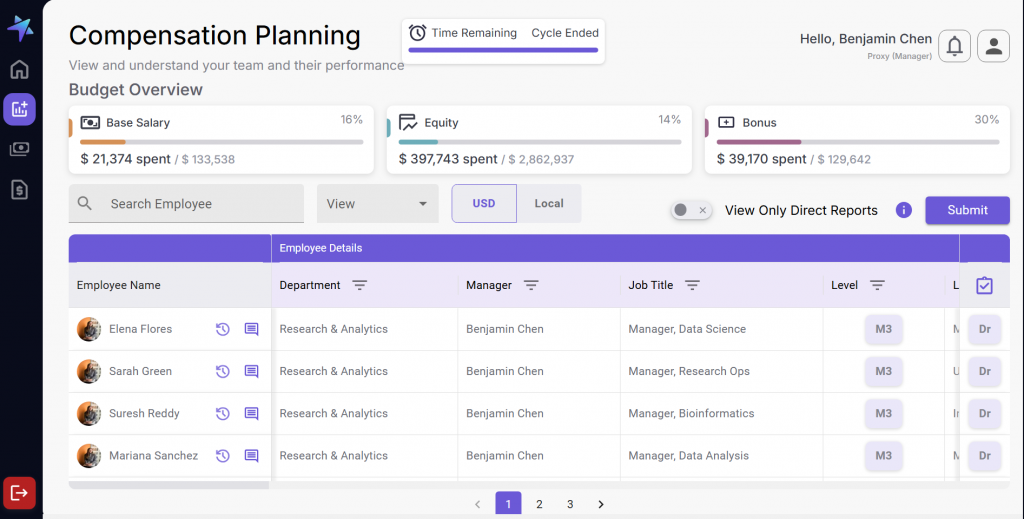
At the top of the interface, you will see three distinct budget panels labeled Base Salary, Equity, and Bonus. Each panel provides real-time insights into budget utilization for that compensation category:
Metrics show how much of the allocated budget has been used (e.g., “$1,200,000 / $1,500,000”).
The bar visually represents the budget currently utilised with respect to the budget allocated for the Base Salary, Equity and Bonus to the Manager and it increases as per the percentage increase that denotes the spent ratio from the allocated budget itself.
Cycle Countdown indicates how many days remain in the planning cycle (e.g., “14 Days Left”).
These panels help you stay aware of constraints while making recommendations. As you adjust compensation for employees, the utilized amount automatically updates to reflect your changes.
Controls
“Search Employee” Allows managers to quickly look up a specific employee by name.
“View Direct Reports Only” shows only people who report directly to the manager logged in the platform.
Currency Toggle helps the manager switch between USD and the employee’s local currency.
Plan Details displays a real-time list of all planners assigned to a compensation plan cycle and their corresponding submission statuses.
“View” Lets users filter and display only one compensation component at a time (Base, Equity, or Bonus).
Use this table as your central hub. From here, you can open detail panels, make adjustments, and track progress.
Employee Table
The Employee Table is the main area where you can view and manage all compensation-related details for each employee you oversee. This table displays each employee on a separate row with comprehensive information.
Columns and Descriptions:
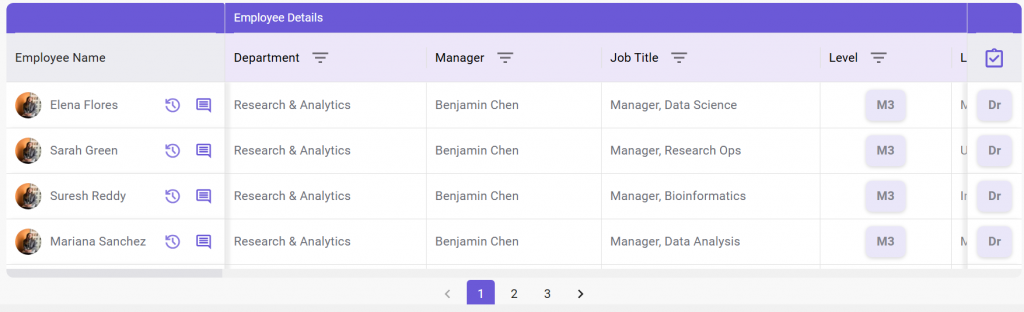
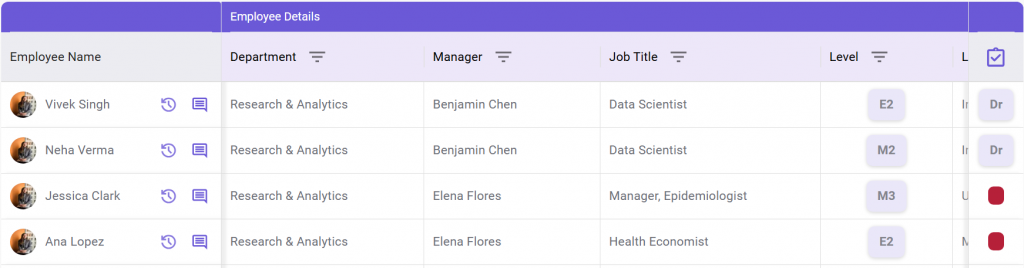
Employee Name: Displays the employee’s name and photo and has options to see Comments and History.
Department: Indicates the current department or team the employee belongs to.
Manager: Shows the name of the employee’s direct supervisor.
Title: Displays the employee’s current job title (e.g., Software Engineer).
Level: Indicates the employee’s career band or grade within the company.
Location: Specifies the employee’s office or work location.
Hire Date: Shows the date the employee joined the organization.
Base Salary: Displays the current annual or monthly base salary.
Performance Rating: Shows the most recent performance evaluation score.
Promotion: A dropdown menu allowing users to propose a promotion by selecting a new level.
Comments: Opens a panel where users can add or view comments related to compensation.
Compensation History: Opens a side panel showing the employee’s compensation history and trends
Actions tab hold the “Dr” tag i.e. Direct Reporting, under the manager who has logged in and the Red Icon would refer to when the employee’s reporting managers have not submitted the updated records.
Compensation Adjustment Panel
When editing an employee’s record, this panel opens to allow direct modifications. The compensation is decided by the reporting managers as per the employee’s performance rating. It has four sub-sections:
Base Salary Adjustment
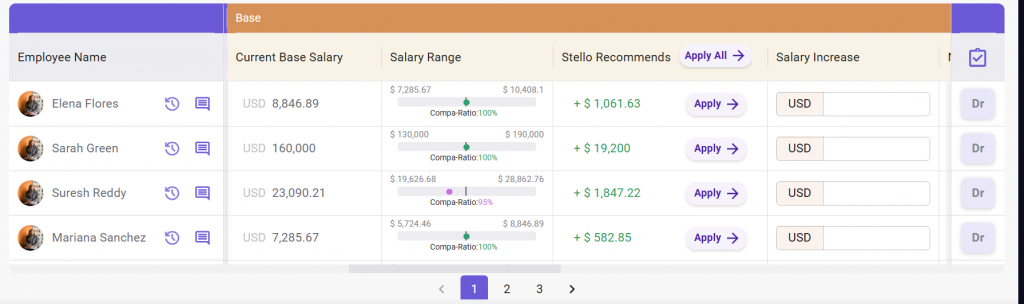
Current Base Salary – Present annual fixed pay before adjustments, used for comparisons and increase calculations.
Salary Range – Min and max salary for role, level, location; includes Compa-Ratio and visual position indicator.
Compa-ratio, a pay positioning metric used to see how an employee’s current pay compares to the market midpoint for their role which influences the salary range.
It is calculated as:
Stello AI Recommendation auto-fills with suggested values by merit matrix calculations.
Salary Increase – Manually entered raise amount in USD, overriding AI suggestion and updating budgets instantly.
New Base Salary – Updated annual salary after adding increase, automatically recalculated from current base salary plus raise.
Users should consult the range and compa-ratio before entering or accepting the recommendation.
Equity Adjustment
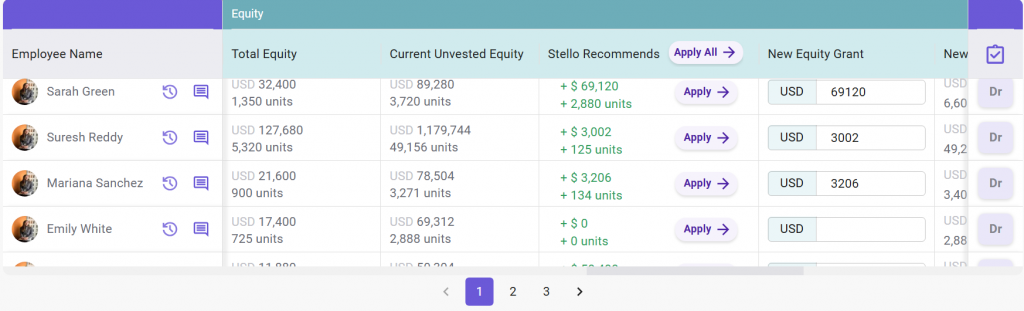
Total Equity – Shows the combined value and units of both vested and unvested equity.
Current Unvested Equity – It refers to the portion of stock options or shares granted to an employee that they have not yet earned through the vesting schedule. These shares are not owned outright and can be forfeited if employment ends before vesting.
Stello AI Recommendation auto-fills with suggested values by merit matrix calculations.
New Equity Grant – Field to enter a proposed additional equity amount.
New Total Unvested Equity – It is the updated total value or number of shares from all unvested equity grants after adjustments such as promotions, refresh grants, or new stock option allocations, still subject to the vesting schedule.
Use this to reward long-term performance or drive retention.
Bonus Adjustment
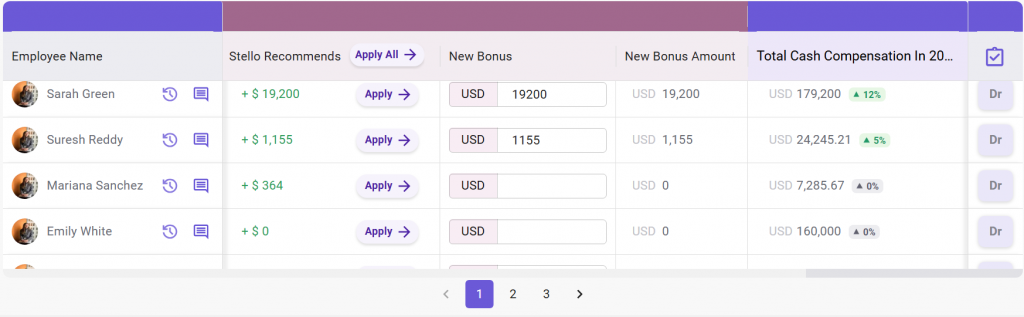
Target Bonus – Displays the planned or target annual bonus amount.
Stello AI Recommendation auto-fills with suggested values by merit matrix calculations.
New Bonus – Field to manually enter a proposed updated bonus.
New Bonus Amount – Shows the recalculated total bonus after applying the updated or recommended bonus value.
It is ideal for aligning bonus with performance and staying within budget.
Total Cash Compensation Summary
Shows total annual compensation as Base + Equity + Bonus with updates live as changes are made.
This overview ensures that final numbers are balanced and compliant before submission.
Stello AI’s Startup Program is live! Small, growing teams interested in working with us can apply for complimentary access to Stello’s AI compensation agent.
With Stello AI, your team can model different budget scenarios to stay within budget while maintaining pay equity and rewarding top performers.
AI Market Pricing
Accelerate your salary benchmarking process. Use Stello AI to accelerate your job matching and market pricing processes.
Compensation Planning
Manage an entire compensation cycle with integrated data to support compensation change decisions.
Total Rewards Portal
Send informative employee statements that incorporate total rewards. Allow employees to access their total rewards history at any time through a single portal.
Ad Hoc Increases
Initiate pay changes throughout the year, whether via base salary increases or spot bonuses.
AI Compensation Agent
Iconic is your company’s newest compensation partner, able to answer questions about your compensation data and handle complex calculations in seconds.